




Text Message Scams: What They Are and How to Avoid Them
Security & Fraud
Learn the signs of and how to protect yourself from text message scams.
Text message scams are a common form of cybercrime. Scammers impersonate legitimate companies to trick you into giving them personal information. They then use this data to access your accounts or sell this information to others. Here are some common scam tactics.
-
Suspicious Activity: Claiming there is an issue with your account
-
Free Prize, Trip, or Gift Card: Click a link to claim your prize
-
Debt Relief: Offering to help you pay off loans
-
Fake Shipping Notice: Asks you to return an item you never ordered
The goal is to get you to reply or click a link that will lead to a phony website or malware that steals your information.
Two Examples
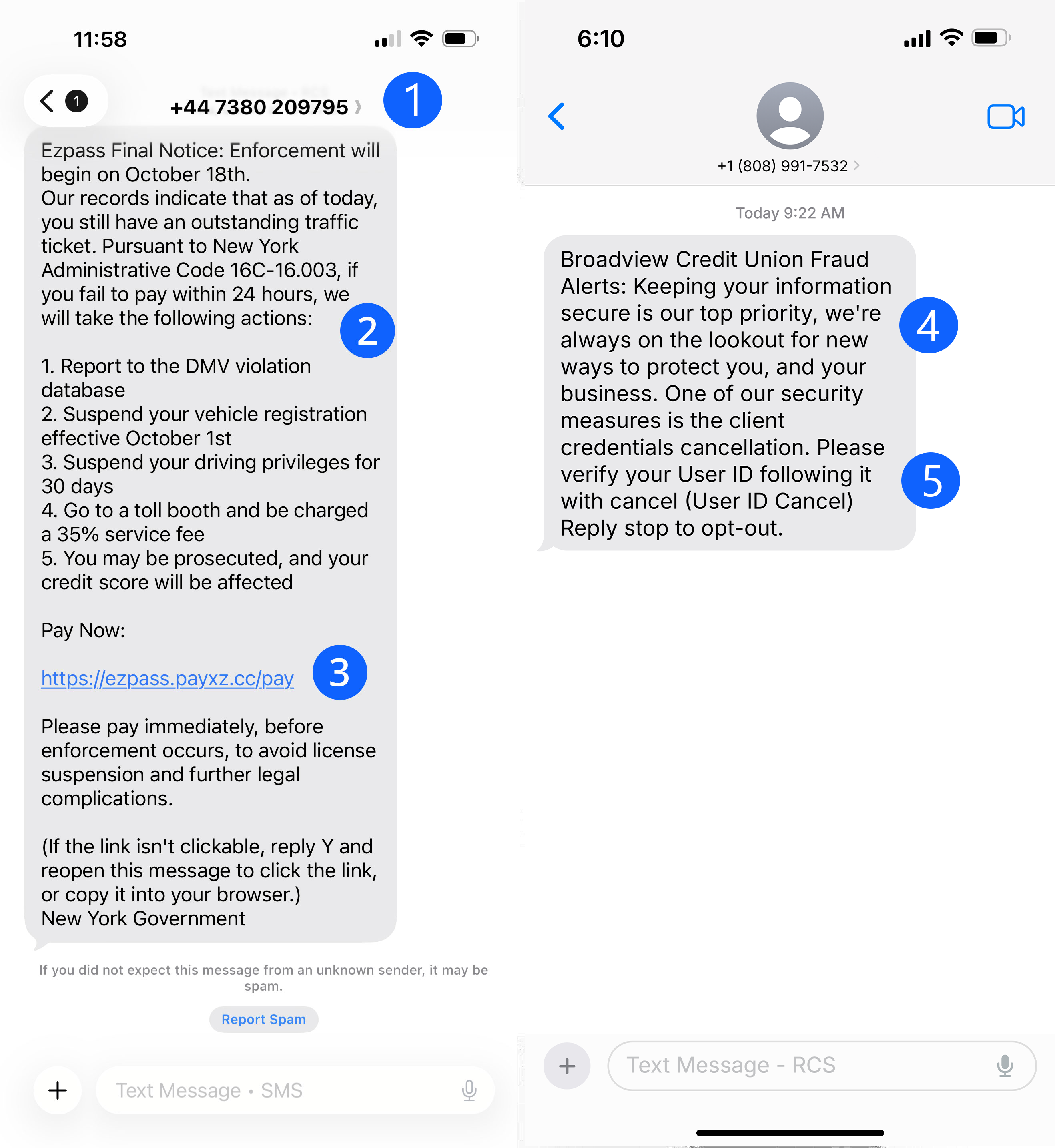
Examples of fraud texts.
- Strange Phone Number - Always check the sender. Legitimate bank text alerts typically come from an official 4–5 digit short code, not a full or unfamiliar phone number. If the number looks off, the message likely is too.
- Urgent Warning or Request - Scam texts often try to pressure you with threats like account suspension or demands for immediate action. Real bank messages won’t use panic or urgency to force you into responding or sharing information.
- Suspicious Links - Financial institutions typically do not send clickable links through text messages. If you receive one, don’t tap it. Instead, verify the message by visiting their official website, or calling the number on the back of your card.
- Odd Grammar or spelling mistakes - Take a closer look at how the message is written. Typos, strange wording, or awkward grammar are common indicators of a scam.
- Request for personal information - Any text message asking for confidential information such as passwords, PINs, account numbers, or Social Security numbers should be treated as a scam. Financial institutions will never ask for this type of information via text.
How to Protect Yourself
- Use Caution with Links: Legitimate companies won't ask for info via text
- Verify Sources: Contact companies using verified phone numbers or websites
- Filter Messages: Block spam texts with phone features, service provider tools, or call-blocking apps
Report Spam and Scam Texts
- Forward to 7726 (SPAM): Helps your service provider block similar messages
- Report in your Message app: Use the option to report junk or spam
- Report to Federal Trade Commission: Visit ReportFraud.ftc.gov
To learn more and protect yourself from scammers, explore our Security and Fraud Prevention resources.
